Anear Platform - Global Architecture
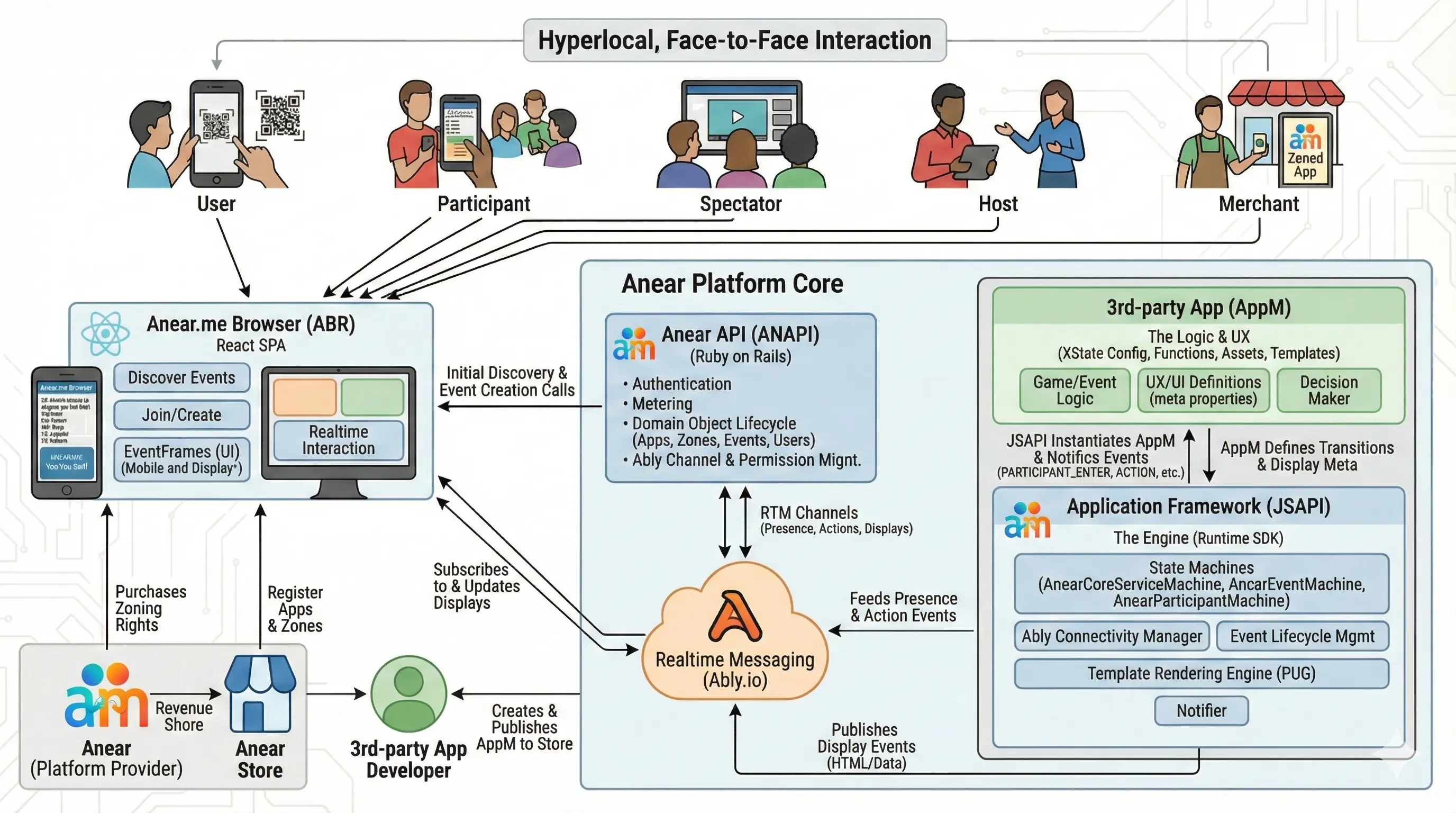
Table of Contents
- The Anear Philosophy: Hyperlocal, Face-to-Face Interaction
- Anear JS API - Architectural Overview
- System Purpose
- Anear Developers and the Developer Ecosystem
- Core User Journey: The Spectator-to-Participant Flow
- End-to-End Messaging Sequence: Create -> Join -> Participate
- Core Architecture Components
- 1. State Machine Hierarchy
- 2. Key State Machines
- 3. Channel Architecture
- 4. Integration Points
- 5. Display Architecture
- 6. Host vs. Participant Distinction
- 7. RENDERED Event Synchronization
- 8. Event Lifecycle Management
- 9. Apps, Zones, Events, and Geolocation
- 10. Timeout Management
- 11. Template System
- 12. Error Handling & Recovery
- 13. Scaling Considerations
- Key Benefits
- AppM Display Sizing Guidelines
- Embedded Child Apps (
<anear-app>) Contract (Parent ↔ Child) - Guest User Flow
- Registered Auth and Google OAuth
- Ably Permissions Clarification
- Notes
The Anear Philosophy: Hyperlocal, Face-to-Face Interaction
An Anear App is a hyperlocal experience designed for in-person participants who share the same physical space. The core principle is to leverage technology to enhance, not replace, real-world social dynamics. Participants are typically in the same room, fostering an environment of direct, face-to-face interaction.
The primary goal is to facilitate genuine human connection. Anear Apps are explicitly designed to be played together in a shared physical space, embodying a "must be present to win" philosophy. The typical onboarding flow involves scanning a QR code directly from another person's device or a central display screen, immediately grounding the experience in the physical environment.
Unlike many online gaming platforms that connect remote players, Anear intentionally occupies the niche of in-person social entertainment. The platform is not for remote play; it is a tool for building community and making shared experiences more engaging. The platform supports two primary models: hosted and self-paced. In a hosted event, a Host acts as a physically present facilitator—a teacher, corporate trainer, or master of ceremonies—who guides a group activity. Alternatively, many Anear apps are self-paced experiences like card games, where a group of equal participants play together. In this model, one person creates the event but then participates on equal footing with everyone else. This flexibility allows Anear to power a wide range of in-person social interactions, from structured presentations to casual, peer-to-peer games.
For businesses, merchants, and other convening authorities, Anear provides a powerful tool for audience engagement. By creating memorable, fun, on-location activities, they can foster a stronger sense of community, make a lasting impression, and improve customer/attendee retention.
Anear JS API - Architectural Overview
Note: This document provides a high-level overview of the Anear ecosystem. The sections below focus specifically on the
anear-js-apiand its role within the platform.
System Purpose
The anear-js-api is a runtime SDK that enables app developers to create real-time interactive events without needing to understand the underlying complexity of Ably.io interactions, event lifecycle management, and participant/spectator coordination.
Anear Developers and the Developer Ecosystem
The Anear platform is designed as a three-sided ecosystem:
- Anear Developers build Apps — the game, quiz, training, or activity logic.
- Merchants / Venues host events that run those Apps in their physical locations.
- Participants & Spectators scan a QR code and join the experience in person.
Most of this document focuses on the runtime mechanics that make these three sides work together. This section calls out the Developer side explicitly, because it is the audience whose surface area is growing fastest and whose contract this document is implicitly defining.
Who is an Anear Developer?
An Anear Developer is anyone who builds an App — a state-machine-driven, real-time interactive experience that runs on the Anear platform. Today, an App is typically:
- A JavaScript project that depends on the
anear-js-apiSDK - An XState
AppEventMachinedescribing the interaction model (lobby → live → end) - A set of PUG view templates and CSS that render inside the ABR's 9:16 portrait canvas
- An asset bundle (images, fonts, sounds) that the platform uploads to CloudFront
Existing example Apps that developers can study and fork:
anear-hsm-test— Tic-Tac-Toe; the canonical "shared viewable board, turn-based" patternanear-q-and-a— Q&A; the canonical "selective participant rendering" pattern
The most complete, practical onboarding reference for App developers lives in the anear-hsm-test repository:
- Anear Developer Guide — covers AppM structure, event handling, web components, asset management, and deployment, with a worked Tic-Tac-Toe example end-to-end. (Lives in the sibling
anear-hsm-testrepository.)
Current Developer Surface
The pieces of the platform that App developers interact with directly today:
| Surface | Purpose |
|---|---|
anear-js-api SDK |
Runtime that brokers Ably, presence, and display rendering on behalf of the AppM |
AppEventMachine (XState) |
Developer-authored state machine that drives event logic |
<anear-*> web components |
Markup primitives for actions, timeouts, anchors, and embedded child apps |
Developer REST API (api/developer/v1) |
Manage apps, assets, and developer-only event operations |
| Asset pipeline | CSS / images / fonts auto-uploaded to CloudFront |
Example Apps (anear-hsm-test, anear-q-and-a) |
Reference implementations for the major interaction archetypes |
See Developer API Authentication (ANAPI api/developer/v1) for credential and JWT details, and App Developer Integration for the JSAPI integration surface.
Future: Anear Developer Portal
The Developer side is currently served by hand-rolled tooling and per-developer credentials issued by the Anear core team. The roadmap is to consolidate this into a first-class Anear Developer Portal — a web UI (served by ANAPI) that will provide:
- Self-service developer registration — sign up, verify, and create a developer account without operator involvement
- API key / secret management — issue, rotate, and revoke credentials used against
api/developer/v1 - App registry & versioning — create new Apps, manage releases, promote between staging and production
- Asset bundle uploads — drag-and-drop CSS / image / font bundles instead of CLI scripts
- Event templates & sandbox runners — spin up isolated Events for App development and load testing
- Usage, billing, and analytics — per-App event counts, participant minutes, and CDN traffic
- Documentation & in-portal examples — the Developer Guide, reference Apps, and live playgrounds in one place
The portal is the front door for the broader ecosystem vision below.
Future: Third-Party Developer Ecosystem
Anear's long-term direction is an open ecosystem of third-party App developers building on the platform — analogous to how a console platform attracts independent game studios, or a SaaS attracts integration partners. Concretely this means:
- External developers — studios, agencies, indie creators, educators, and corporate trainers — author Apps without being part of the Anear core team
- Apps become a catalog that Merchants browse and install into their Venues, rather than being hand-rolled per deployment
- Marketplace economics — revenue share between App authors, Merchants, and the Anear platform; per-event or subscription pricing models
- Developer support tooling — issue tracking, App review/certification, content moderation, and a public changelog of platform changes that affect Apps
- Stable, versioned contracts — the
AppEventMachineAPI surface, theapi/developer/v1REST surface, and the<anear-*>web component contract all evolve under explicit versioning so third-party Apps don't break under us
Designing the JSAPI as a clean SDK with a stable AppEventMachine contract, and the ANAPI with a versioned api/developer/v1 surface, is the foundation that makes this future possible. Every architecture decision in this document should be read with that long-term contract in mind: what we expose to the JSAPI today is what third-party developers will program against tomorrow.
Core User Journey: The Spectator-to-Participant Flow
A cornerstone of the Anear user experience is the seamless transition from a passive spectator to an active participant. This flow is intentionally designed to be low-friction, encouraging easy onboarding for new users by illustrating the interplay between the Anear-Browser (ABR), Anear API (ANAPI), and the Anear JS API.
The Scan & Spectator Entry: A new user scans a QR code displayed on another participant's device. The Anear-Browser (ABR) loads the event, and the user is automatically subscribed to the
spectatorsDisplayChannel. They see the current state of the game and a call-to-action (e.g., a "JOIN" button).The "Join" Action: The user decides to participate and clicks the "JOIN" button in the ABR.
The ABR/ANAPI Handshake: The ABR, which manages the user's identity (guest or registered), sends a request to the Anear API (ANAPI) to formally register this user as a participant in the event.
Presence Entry: Upon successful registration, the ANAPI provides the ABR with the necessary credentials. The ABR then uses these to perform a
presence.enter()on the event'sactionsChannel. This is the crucial client-side signal that they are ready to participate.JSAPI & AppM Reaction: The Anear JSAPI engine, which is listening to the
actionsChannel, detects this presence event. It sends aPARTICIPANT_ENTERevent to the specific game's application logic (the AppM), which then updates its state accordingly (e.g., assigning the user to the 'O' player slot in Tic-Tac-Toe).
End-to-End Messaging Sequence: Create -> Join -> Participate
The sequence below is the code-backed flow across ABR (anear-browser), ANAPI (anear_api), and JSAPI (anear-js-api) for:
- creator creates event and joins as participant,
- app process receives
CREATE_EVENTand starts AEM, - joining user enters as spectator and then becomes a participant.
Key Message Bodies and Channels
- Create event request (
POST /api/v1/events):- JSON:API resource with
data.type = "events". data.relationships.zone.data.idselects the app zone.- optional event bootstrap data in
data.attributes["initial-context"].
- JSON:API resource with
- Create event response (
AppEventSerializer):- event identity and lifecycle fields including
slug,state,hosted. - channel names used by ABR and JSAPI, including
event-channel-name,participants-channel-name,actions-channel-name, and (when enabled)spectators-channel-name.
- event identity and lifecycle fields including
- ANAPI -> app publish (
CREATE_EVENT/LOAD_EVENT):- message type is
CREATE_EVENT(orLOAD_EVENTfor rehydration). - payload is a serialized event JSON string published to the versioned app lifecycle channel
anear:<app_id>:v:<app_version>:e.
- message type is
- Participant join request (
POST /api/v1/event_participants):- JSON:API resource with
data.type = "participants". data.relationships.event.data.ididentifies the event.- optional
attributes.alias_nameand relationshipmeta.qr.
- JSON:API resource with
- Participant join response (
UserParticipantSerializer):- participant identity fields (
id,user-type, relationships). - attach targets for ABR:
actions-channel-name,participants-channel-name(non-host), andprivate-channel-name.
- participant identity fields (
- ABR action/presence payloads:
- spectator presence enter uses user id on
spectatorschannel. - participant presence enter uses participant id on
actionschannel. - user actions are published on
ACTIONwith body{ participantId, payload }.
- spectator presence enter uses user id on
Implementation Notes
- Spectator access is policy-driven from
GET /api/v1/events/:id_or_slug; there is no dedicated spectator-join API endpoint. - AEM participant session creation is presence-driven: Ably
PARTICIPANT_ENTERtriggers participant fetch andstartNewParticipantSession, followed by role-specific AppM notification (HOST_ENTERorPARTICIPANT_ENTER). - ABR explicitly detaches spectator channel after join to avoid spectator/participant display races during role transition.
Load-Test Driver for This Flow
The primary load-test direction for this exact flow is a headless-browser harness that simulates full ABR clients (React runtime + ANAPI calls + Ably attach/presence/messaging).
HTTP-only load tests are useful for endpoint capacity, but they do not capture the Ably presence/pub-sub sequencing that drives AEM participant and spectator behavior. For this flow, treat browser-driven results as the source of truth.
Planned phased progression for the browser-driven harness:
- Phase 1: 1 creator browser creates event and joins; N joiner browsers open
/e/:slugand attach as spectators. - Phase 2: N spectators trigger JOIN and convert to participants; measure conversion throughput and latency.
- Phase 3: introduce reconnect/drop and refresh churn to validate AEM participant/spectator recovery behavior.
Core Architecture Components
1. State Machine Hierarchy
AnearCoreServiceMachine (Root)
├── AnearEventMachine (Per Event)
│   └── AppEventMachine (Developer's App Logic)
Roles & Responsibilities: JSAPI vs. AppM
A key architectural principle is the clear separation of concerns between the Anear JSAPI (the "engine") and the App Event Machine (the "application").
JSAPI (AEM): The Engine Room
The JSAPI is responsible for all the underlying infrastructure and communication mechanics. Its concerns are purely technical.
- Event Lifecycle & State: Manages the low-level state transitions of an event (
created→announce→live→closed) and the lifecycle of participants. - Real-time Communication: Handles all Ably channel setup, messaging, presence events, and connection state.
- Orderly Operations: Ensures smooth, reliable startup and shutdown of all services and participant connections.
- Notifier: The JSAPI acts as a notifier. It informs the AppM of important events (
PARTICIPANT_ENTER,PARTICIPANT_DISCONNECT,ACTION,ACTIONS_TIMEOUT) but does not decide what these events mean for the application.
AppM: The Application & User Experience
The AppM developer is responsible for everything related to the specific event's logic and what the user sees.
- Game/Event Logic: Controls the flow, rules, and state of the interactive event.
- User Experience (UX/UI): Defines what the user sees at every stage via
metadisplay properties in its state nodes. All display content is the AppM's responsibility. - Decision Maker: The AppM is the decision-maker. When the JSAPI notifies it of an event (e.g., an
ACTION/ACTIONS_TIMEOUT), the AppM decides what to do. Should the game end? Should the participant be removed? Should the state change? That is application-level logic.
This strict separation allows AppM developers to focus entirely on their application logic without needing to manage the complexities of real-time infrastructure.
2. Key State Machines
AnearCoreServiceMachine
- Purpose: Highest-level parent state machine managing realtime messaging and event lifecycle
- Responsibilities:
- Initialize Ably.io realtime messaging
- Manage multiple concurrent events via
anearEventMachinesobject - Handle app data fetching and asset uploads (CSS, images)
- Load and compile PUG templates
- Listen for
CREATE_EVENTandLOAD_EVENTmessages from backend via Ably REST API
- Key States:
fetchAppDataWithRetry→initRealtimeMessaging→waitAnearEventLifecycleCommand
JSAPI Bootstrap Sequence
Before any application-specific logic (AppM) runs, the JSAPI engine performs a standardized bootstrap sequence upon startup:
- Fetch App Config: Retrieves the application's configuration from the Anear API.
- Initialize Real-time: Establishes and authenticates the connection to Ably.
- Sync Assets: Checks local assets (
/images,/css) against the CDN and uploads any new or changed files. - Compile Templates: Loads and compiles all PUG templates from the
/viewsdirectory for fast rendering. - Await Trigger: Enters an idle "waiting" state, listening on its primary channel for a
CREATE_EVENTcommand from the backend to instantiate a new AppM.
Event Creation Flow (Enhanced)
- User Action: Mobile client clicks on Global App or Zoned App
- Backend Processing: ANAPI creates event record with:
- Slug generation for URL-friendly identifiers
- QR code creation for event discovery (except cloned events)
- Location setting based on user/zone location
- Permission validation (zone access, user status)
- Event Publishing: ANAPI publishes
CREATE_EVENTmessage via Ably REST API - JS-API Reception: anear-js-api receives message and begins processing
AnearEventMachine
- Purpose: Manages individual event lifecycle and participant coordination
- Responsibilities:
- Handle event lifecycle states:
created→announce→live→closed - Route messages between participants and app logic
- Manage participant presence (enter/leave/exit)
- Coordinate display rendering for all channels
- Handle
allParticipantstimeout orchestration (finalAction,ACTIONS_TIMEOUT,nonResponderIds) - Handle cancellation of active group timeout orchestration (
cancelAllParticipantsTimeout)
- Handle event lifecycle states:
- Key States:
registerCreator→eventCreated→announce→live→closeEvent
Participant Private Channel Handling (APM-less)
- Purpose: AEM manages participant private channels directly.
- Responsibilities:
- Handle participant private channel communications
- Track participant reconnect/presence state
- Route participant-specific actions to app logic
3. Channel Architecture
Ably.io Channels
eventChannel: Event control messagesactionsChannel: Participant presence events + ACTION clicksparticipantsDisplayChannel: Group display messages for all participantsspectatorsDisplayChannel: Display messages for all spectatorsprivateChannel: Individual participant private displays (per participant)- Channel name received by anear-browser when participant JOINS event
- AnearEventMachine retrieves private channel name via ANAPI when processing PARTICIPANT_ENTER
- Only publishers and subscribers have access permissions to attach to private channels
Message Flow
- Presence Events: Ably presence API →
actionsChannel→ XState events - Action Events: Participant clicks →
actionsChannel→ App logic - Display Events: App state transitions →
AppMachineTransition→ Channel rendering
Display Event Flow
AppM state transition with meta
    ↓
AppMachineTransition callback
    ↓
Parse meta.eachParticipant/allParticipants/host/spectators
    ↓
Generate display events with template context
    ↓
Route to appropriate channels:
  - participant → private channel (per participant)
  - participants → participants display channel (all participants)
  - spectators → spectators display channel (all spectators)
4. Integration Points
App Developer Integration
- Factory Functions:
appEventMachineFactory(participant machine factory removed in vNext) - Event Reception:
PARTICIPANT_ENTER,HOST_ENTER,ACTION,ACTIONS_TIMEOUT, etc. - Display Control: XState
metaproperties define templates and timeouts - Context Access: Rich context passed to PUG templates for flexible rendering
- Automatic Integration:
AppMachineTransitioncallback automatically wired toAppEventMachine.onTransition
Developer API Authentication (ANAPI api/developer/v1)
The Anear platform exposes a Developer REST API (served by ANAPI) for app developers / app services (e.g. JSAPI processes) to manage apps, assets, and developer-only event operations.
- Challenge (credentials → token): Developer credentials (
api_key,secret) are used only to obtain a short-lived JWT.- Endpoint:
POST /api/developer/v1/sessions - Body (JSON:API):
data.attributes.api_key+data.attributes.secret - Response:
auth_token(JWT),expires_at(unix epoch seconds),developer_id
- Endpoint:
- Authenticated requests (token → access): All other
api/developer/v1/*requests must use:Authorization: Bearer <auth_token>- ❌ No per-request
X-Api-Keyheader (legacy behavior removed)
- Expiry: JWT expiry is enforced by ANAPI (configured via
developer_api_token_expiration_interval_hours). - Scope: Developer JWTs include a
scope=developerclaim and are distinct from end-user (ABR) auth tokens.
Merchant -> Venue Architecture (ANAPI api/merchant/v1, api/v1, and api/admin)
For "Anear for Live Events" (weddings-first), Merchant/Venue support is intentionally split into:
- Merchant-owned management surfaces (
/api/merchant/v1) - Guest/participant consumption surfaces (
/api/v1) - Internal platform operations (
/api/admin)
This separation keeps merchant CRUD and operational controls private while allowing guests to consume venue experiences through standard app APIs.
Core Domain Model
- Merchant
- Owned by a single user (
merchant.owner). - Can save optional app affinity/favorite links via
merchant_apps.
- Owned by a single user (
- Venue
- Belongs to a
merchant. - Has lifecycle state (
created,announce,live,closed,canceled). - Has guest landing metadata:
nametitledescriptionvenue_photo_urlscheduled_at(start date/time)duration_minutesslug+ QR code
- Belongs to a
- VenueZone
- Assignment of one app-capable zone to one venue.
- Backed by
Zonewithzone_type: venue. - Replaces older "venue app" coupling with a zone-centric model.
Merchant Owner API (/api/merchant/v1)
Used by merchant dashboards/workflows to curate venues, discover apps, save favorites, and assign venue zones.
- Merchant profile
GET /merchant(show)PUT /merchant(update)
- Merchant app favorites / affinity
GET /merchant_appsPOST /merchant_appsDELETE /merchant_apps/:id_or_app_id
- Venue management
GET /venuesPOST /venuesGET /venues/:idPUT /venues/:id
- Venue app assignment (via zones)
GET /venues/:venue_id/venue_zonesPOST /venues/:venue_id/venue_zonesDELETE /venues/:venue_id/venue_zones/:id_or_zone_idmerchant_appsare not required for assignment; they are optional merchant affinity data only.
- Event host access management (per venue app / venue zone)
GET /venues/:venue_id/venue_zones/:venue_zone_id/event_host_invitationsPOST /venues/:venue_id/venue_zones/:venue_zone_id/event_host_invitationsGET /venues/:venue_id/venue_zones/:venue_zone_id/event_host_invitations/:idPUT /venues/:venue_id/venue_zones/:venue_zone_id/event_host_invitations/:idDELETE /venues/:venue_id/venue_zones/:venue_zone_id/event_host_invitations/:idPOST /venues/:venue_id/venue_zones/:venue_zone_id/event_host_invitations/:id/resend- Invitations are scoped to one
venue_zone, which in practice means one specific app assignment within a venue. - Merchants invite by email (or existing
invited_user_id) and, when the app definesevent_roles, must choose one or more role ids for that invite. - If the hosted app defines no
event_roles, the invited person is treated as a full host for that app and the runtime role payload falls back to an implicit default host role.
- Venue media upload presign
POST /venue_media_uploads(returns S3 presigned POST + final CDN URL)- Purpose currently:
cover_photo - Server-enforced constraints:
- Allowed mime types: jpeg/png/webp/gif
- Upload size cap: 6MB
- Venue lifecycle transitions
POST /venues/:venue_id/transition(announce,go_live,close,cancel)
Guest/Participant Venue APIs (/api/v1)
Used by ABR guest flows after QR scan and/or prior participation.
- Joined venue playables
GET /playable_venues- Returns venues derived from participant history.
- Venue landing/detail
GET /venues/:id_or_slug- Returns venue metadata + ongoing venue events (for join/rejoin flows).
- Event host invitation acceptance
GET /event_host_invitations/:tokenPATCH /event_host_invitations/:token- This is the public/consumer-side surface used by the browser invite page after an emailed invite link is opened.
GETreturns invite metadata (venue, app, roles, effective state, and whether it can still be accepted).PATCHaccepts the invite for the currently authenticated user, but only for a full registered account whose normalized email matches the invited email.
Access and Discovery Rules
- Venue pages are not intended for broad "nearby" discovery.
- Intended entry paths:
- Venue QR (
/v/:venue_slug) - "My Events" / joined venue lists.
- Venue QR (
- Venue detail access is restricted to users with prior venue participation context.
- Event join authorization still applies at event level (state, participant limits, invitation/private rules, etc.).
Auth Strategy Notes
- Merchant management endpoints are protected by merchant authorization (
MerchantBaseController). - Internal admin endpoints remain role-protected under
Api::Admin::AdminBaseController. - End-user JWTs now include role claims (
roles) and optional merchant context (merchant_id), enabling role-based authorization decisions without requiring multiple user-facing token types. - Backward compatibility with legacy merchant-scoped tokens is preserved during transition.
Event Host Invitation Lifecycle
The merchant event-host system is intentionally modeled as an access lifecycle instead of a one-shot email:
- Invitation states:
waiting,accepted,revoked,expired,superseded - Expiration: event-host invite tokens expire after 7 days by default
- Uniqueness rules:
- only one waiting invite per
venue_zone + email - merchants cannot invite themselves
- an already-active host cannot receive a duplicate fresh invite for the same venue app
- only one waiting invite per
- Acceptance rules:
- the accepting user must be a non-guest registered account
- the account email must match the invited email
- acceptance creates or reuses the zone-level
event_hostrecord and syncs the selected event roles onto it
- Revocation:
- revoking an invitation also removes the corresponding zone host access when the invite had already been accepted
- Resend:
- resend rotates the token, extends expiry, and returns the invite to
waiting
- resend rotates the token, extends expiry, and returns the invite to
- Superseding:
- when a pending invite's role set changes, the old token is superseded and a replacement invitation is issued
- the old link remains auditable but is no longer valid for acceptance
Event Host Role Updates vs Event Lifecycle
Role changes are lifecycle-aware so merchants can safely adjust staffing before and during an event:
- Pending invite, pre-acceptance:
- role changes create a successor invitation and supersede the previous token
- Accepted invite, pre-live hosted event:
- removed roles are applied immediately to the current host assignment
- newly added roles trigger a replacement invite so the invitee explicitly re-accepts the expanded responsibilities
- Live hosted event present:
- role changes are applied directly to the active host assignment without waiting for re-acceptance
- ANAPI publishes a fresh
EVENT_HOSTS_SYNCpayload so the running AEM/JSAPI process can refresh host rosters and role metadata in-place
- Closed/canceled hosted events:
- no pre-live notification email is sent for role updates once the relevant hosted events are already terminated
Event Host Audit Trail
Every host-access change is recorded as an EventHostAccessActivity, giving merchants a per-email, per-venue-app history feed:
- Activity types currently include
invited,resent,accepted,revoked,superseded,roles_added,roles_removed,role_update_invited, andlive_role_update - Merchant detail responses can include this history to explain why a host currently has access, lost access, or received a replacement invite
- The audit log is keyed by
venue_zone,email, invitation linkage, actor user, target user, and structured role details
Internal Admin API (/api/admin)
For platform operators managing onboarding and break-glass operations.
- Merchant/Venue CRUD
- Merchant app favorites / affinity
- Venue zone assignment
- Venue transition endpoints
ABR Operational Surfaces (anear-browser)
/ops: internal onboarding route for admin/developer workflows./merchant: merchant dashboard workflow (merchant role) for:- venue create/edit
- app discovery and favorites
- venue-zone assignment
- venue cover photo upload
- event launch/re-entry actions
/event-host-invite: public invite landing/acceptance route for merchant-invited event hosts- reads invite token from query string
- shows invite metadata and current effective state
- routes signed-out invitees into login, signup, or Google OAuth, then returns them to the same invite after auth
- only allows final acceptance from a registered account, never from a guest session
Venue Display Media / QR Placard Architecture
The Live Events merchant stack now includes a dedicated venue-display-media subsystem for producing printable QR placards and related preview assets.
Purpose
- Gives merchants print-ready venue signage that routes guests into the correct venue experience
- Supports richer branded display media than the original one-shot QR PDF download
- Separates heavyweight PDF rendering from the synchronous request/response path
Primary Domain Model
VenuePlacard- One persisted record per
venue + format_key - Stores merchant-editable print metadata such as
title,description,border_style, and optionalprint_photo_url - Tracks generation state via
status(idle,processing,ready,failed),status_message,generated_at, anderror_message - Owns generated Active Storage artifacts:
pdfpreview_imagethumbnail_image
- One persisted record per
VenuePlacard::FormatRegistry- Defines supported print variants and template/layout metadata
- Current examples include:
18x24_portraitfor entrance placards5x7_landscapefor tabletop cards
VenueQrPlacard::BorderRegistry/ theme helpers- Provide theme bundles, border assets, picture frames, and category-aware theme selection
Merchant API Surfaces
GET /merchant/v1/venues/:venue_id/placards- Ensures supported placard variants exist and returns the merchant-facing placard records
GET /merchant/v1/venues/:venue_id/placards/:format_key- Returns one format-specific placard record
PUT /merchant/v1/venues/:venue_id/placards/:format_key- Saves editable placard metadata without generating a new PDF
POST /merchant/v1/venues/:venue_id/placards/:format_key/generate- Persists current edits, marks the placard as processing, and enqueues async PDF generation
- Legacy compatibility surfaces still exist:
GET/POST /merchant/v1/venues/:venue_id/qr_placardGET /merchant/v1/venues/:venue_id/qr_pdf- These represent the older single-placard/simple-download path, while
placards/:format_keyis the newer extensible architecture
Generation Pipeline
- Merchant edits placard content/theme in ABR merchant UI.
- ANAPI validates and persists the
VenuePlacardrecord. VenueQrPlacard::EnqueuePdfGenerationflips the record intoprocessingand enqueuesGenerateVenuePlacardPdfJob.- The job calls
VenueQrPlacard::Generator. - The generator:
- validates format and optional print-photo URL
- renders HTML from server-side ERB print templates
- embeds QR SVG output and theme assets
- uses Grover/Chromium to render the final PDF
- rasterizes page 1 into preview and thumbnail PNGs
- attaches all artifacts through Active Storage
- updates the placard record to
readyorfailed
Pipeline Sequence Diagram
Pipeline Implementation Details
- Format registry —
app/models/venue_placard/format_registry.rbdefines page size (18x24_portraitis 18.25″ × 24.25″ to bleed past trim), the Grover template, photo box dimensions, and target DPI (300 for print). - HTML self-contained — the worker base64-inlines the photo, border art, picture frame, fonts (
CormorantGaramond-Bold.woff2,GreatVibes-Regular.woff2) and the QR SVG so Chromium never needs network during the render. SetVENUE_QR_PLACARD_DEBUG_HTML=1to dump the HTML totmp/venue_qr_placard_html/for offline inspection. - Status surface for ABR —
statustransitionsidle → processing → ready(orfailed), andstatus_messageupdates at each pipeline stage (Preparing→Loading photo→Composing placard→Rendering PDF→Saving PDF→Rasterizing preview→Rasterizing thumbnail) so the polling UI can render fine-grained progress without any push channel. - Failure handling — on any exception the worker sets
status='failed', recordserror_message, and logs a structuredvenue_qr_placard pipeline_failedJSON event. Search recent failures withbin/api-log-peek -m 60 -vor query CloudWatch Logs Insights forplacard_event = "pipeline_failed". - Production smoke —
bin/smoke-pdf-runtimerenders a placard end-to-end against the production Docker image (Grover + Chromium + ImageMagick all present and wired) as part ofFULL=1 rake ci:local. This catches missing native deps long before they hit a real merchant request. - Storage service + URLs —
has_one_attached :pdf, service: AppConfig.merchant_assets_storage_service; production resolves to themerchant_assetsS3 bucket. URLs returned to ABR (pdf_url,preview_image_url,thumbnail_image_url) are time-limited pre-signed links generated by Active Storage, so the browser downloads directly from S3 — the Rails web tier is not in the asset bytes path. - Simpler synchronous sibling —
GET /v1/merchant/venues/:venue_id/qr_pdf(VenueQrPdfsController→VenueQrPdf::Generator) renders a 12″ × 12″ QR-only PDF and streams the bytes directly viasend_data. No background job, no S3, no preview rasterization. Useful for fast one-off downloads; the async placard pipeline above is the one for any rich, photo-bearing, print-shop output.
Artifact Contract
- The merchant serializer returns both editable metadata and generated artifact URLs:
pdf_urlpreview_image_urlthumbnail_image_url
- This allows ABR to behave like a lightweight job client:
- edit
- request generation
- poll/reload status
- switch into preview/review mode once the artifact becomes ready
Architectural Notes
- This subsystem is intentionally asset-oriented, not event-runtime-oriented
- It sits in the merchant operations layer, not in AEM/JSAPI realtime state machines
- QR payload generation still relies on shared platform QR rendering helpers, but the placard pipeline adds print layout, theming, and binary artifact management on top
- Failure states are first-class: generation errors are persisted on the placard record so the merchant UI can surface actionable feedback without scraping logs
Solid Queue for Display Media Jobs
Venue display media generation is one of the first platform features to rely on the app's newer database-backed queueing model.
Why Solid Queue
- Placard generation is CPU/memory heavy because it boots Chromium through Grover and rasterizes preview images
- That work should not run inline with merchant HTTP requests
- Database-backed jobs keep the operational model simple inside the Rails deployment footprint
Current Queue Topology
- Active Job uses
:solid_queuein development and production - The queue tables live in the primary database schema (
solid_queue_jobs, ready/claimed/failed/scheduled execution tables, worker process heartbeats, recurring task metadata, etc.) GenerateVenuePlacardPdfJobis explicitly routed to thepdfqueueconfig/queue.ymlkeeps PDF workers intentionally low-concurrency:- dedicated
pdfqueue threads: 1- process count controlled by
AppConfig.pdf_job_concurrency
- dedicated
- A separate default queue remains available for lighter background/maintenance work
Operational Model
- Merchant generate requests return quickly with
202 Acceptedsemantics while the real work happens in the queue worker - ABR observes the persisted placard
statusinstead of needing a websocket/job-push channel - Development mirrors production by using Solid Queue locally as well, so PDF generation exercises the same async path before deploy
- Production recurring queue maintenance clears finished Solid Queue jobs on a schedule to keep queue tables from growing unbounded
Lay of the Land for Architects
- Think of this as a classic async artifact-generation pipeline:
- CRUD record in primary domain model
- enqueue background work
- generate binary assets
- persist status and downloadable URLs back onto the record
- If future display media expands beyond QR placards (signage sets, social-share exports, sponsor variants, etc.),
VenuePlacard+ format registry + dedicated queue workers is the extensible pattern to build on - If future demand grows, the main scaling levers are:
- more
pdfworker processes - tighter queue isolation for heavy media jobs
- storage/CDN policy for generated artifacts
- stronger observability around job latency/failure rates
- more
Event Video Media: Upload & Transcode Architecture
The platform supports merchant/host-owned video media (for example a guest-recorded tribute clip in an open-house event) alongside the image and PDF display media above. Raw clips are captured in ABR, uploaded direct-to-S3 via a presigned POST, and then normalized by AWS MediaConvert into a set of universally-playable and montage-ready outputs. This is a second async artifact pipeline that deliberately mirrors the QR placard pattern (domain record + string status + thin Solid Queue job + service command + poll-for-status), with one twist: completion is detected by a recurring sweeper, because the heavy encoding runs inside AWS, not inside a worker.
Vocabulary / layering boundary (important). Apps own their own domain words (e.g. a tribute-booth AppM owns SUBMIT_TRIBUTE and its submissions[] shape). ABR and ANAPI stay app-agnostic and speak only "video asset / S3 key / transcode status / MediaConvert". The transcode pipeline transcodes any video MediaAsset regardless of the app's free-form purpose string (tribute_video is just data, never pipeline vocabulary).
Responsibility split across layers
- ABR —
<anear-video-record>captures + uploads the raw clip (client-side bitrate cap, poster-frame capture) and emits generic upload fields (url,filename,poster,duration).<anear-video>plays the result, preferring HLS where natively supported and falling back to the delivery MP4; it honors a genericstatus(processing/ready) so a still-transcoding clip shows its poster with a "Processing…" overlay. - AppM (developer logic) — decides when to request a transcode (e.g. on
SUBMIT_TRIBUTE) and calls a generic SDK capability; it never imposes app names downstream. - JS SDK (
anear-js-api) —AnearApi#requestVideoTranscode(eventId, inputKey, opts)andAnearApi#getMediaAsset(id)are the generic transcode call + status poll the AppM uses. - ANAPI — names everything generically (
MediaAsset,TranscodeVideoJob,Transcode::*), submits the MediaConvert job, and tracks status to completion.
Key components (ANAPI)
GenerateEventMediaUploadPost— existing presign command;POST /api/v1/event_media_uploadsreturns an S3 presigned POST for the raw upload. Video purposes (e.g.tribute_video) acceptvideo/mp4,video/webm,video/quicktimeup to a larger video byte cap.MediaAsset— domain record with a plain-stringstatus(submitted → transcoding → ready | failed, validated, not an AR enum),input_key/input_url, MediaConvertmediaconvert_job_id,output_prefix, deterministic output keys/urls grouped as playback (hls_*,mp4_*), montage source (montage_master_*), and stills/analysis (poster_*,thumbnails_*), plusduration_secs/transcoded_at. A unique index oninput_keyenforces idempotency — a clip is never transcoded twice.Transcode::EnqueueTranscode— find-or-creates theMediaAssetbyinput_key, setssubmitted, and enqueuesTranscodeVideoJob. No-op for an in-flight/ready asset; re-enqueues a previouslyfailedone.TranscodeVideoJob(queue_as :transcode) — thin delegator toTranscode::SubmitMediaConvertJob.Transcode::SubmitMediaConvertJob+Transcode::JobSettings— discovers the account-specific MediaConvert endpoint (cached), builds the inline job settings (single source of truth for output groups + deterministic keys), submits viaTranscode::MediaConvertClient, and flips the record totranscoding(recording the job id + output keys). On submit failure it recordsfailed+error_message.SweepVideoTranscodesJob(recurring, every ~30s,defaultqueue) +Transcode::PollTranscodeStatus— polls every in-flight job viaget_job; onCOMPLETEstores CloudFront output URLs +duration_secsand marksready; onERROR/CANCELEDmarksfailed.
Trigger + status endpoints (/api/developer/v1) — server-to-server, API-key auth scoped to event.app.developer:
POST /developer/v1/media_assets— create + enqueue (returns202 Acceptedwith theMediaAssetattributes). App-agnostic payload (event_id,input_key,input_url,purpose,participant_id,display_name,media_type).GET /developer/v1/media_assets/:id— pollstatus+ output URLs.
Outputs (one MediaConvert job, five output groups) — serving playback and montage roles. Output objects get a PUBLIC_READ ACL so they are CloudFront-servable exactly like current uploads:
| Output | Role |
|---|---|
| Apple HLS ladder (1080/720/480) | adaptive delivery/playback in <anear-video> and dashboards |
| Delivery MP4 (H.264/AAC, faststart, 720p) | universal single-file fallback playback |
| Montage-master MP4 (H.264 High, ~1080p, faststart) | contiguous, concatenation-friendly mezzanine for downstream montage re-encode (never HLS — avoids second-generation segment recompression) |
| Poster JPEG (single frame capture) | dashboard/thumbnail still + generative image-to-video seed |
| Thumbnail strip (frame capture every ~2–3s) | cheap input for a vision LLM to "watch" the clip (highlight scoring, captions, beat-sync ordering) |
S3 layout. The raw upload stays at its original key (e.g. event_media_uploads/<app_id>/<event_id>/<purpose>/<uuid>.<ext> or the venue-scoped venue_media_uploads/<venue_id>/event_media/<event_id>/<purpose>/<uuid>.<ext>). Transcoded outputs land in a sibling transcoded/<uuid>/ prefix (hls/, mp4/, master/, poster/, thumbs/) derived generically from the input key.
Transcode pipeline sequence
Outputs and their consumers
How it parallels — and differs from — the placard pipeline
- Same shape: CRUD a domain record, flip
statussynchronously in the web request (202 Accepted), enqueue a thin job, do the heavy work in a service command, persist status + downloadable URLs back onto the record, and let ABR pollstatus(no push channel). - Different completion model: placard generation finishes inside the worker; transcoding finishes inside AWS, so a low-latency recurring sweeper resolves in-flight jobs instead of holding a worker thread. The
transcodeSolid Queue pool (seeconfig/queue.yml, sized byAppConfig.transcode_job_concurrency) only needs to be large enough to submit jobs quickly. - Idempotency / cost control: the unique
input_keyguarantees a clip is transcoded once; failed assets can be re-enqueued.
Forward-looking (AI montage). This pipeline is intentionally the raw-material producer for a future AI montage maker: the montage-master MP4 is the clip source, posters + photos are stills (and generative image-to-video seeds), and the thumbnail strip lets a vision LLM make editorial decisions cheaply without ingesting full video. Montage assembly (edit-decision list → concat/transitions/Ken-Burns/music/titles → final MP4 + HLS → delivery) is a separate, later effort.
Operational config + IAM. MediaConvert assumes an IAM role to read the input and write transcoded outputs (trust + permission policy templates live in config/mediaconvert/); the role ARN is read from Rails.application.credentials[<env>].aws_assets_folder.mediaconvert_role_arn or AWS_MEDIACONVERT_ROLE_ARN. Operational knobs (transcode_job_concurrency, mediaconvert_output_subdir, mediaconvert_thumbnail_interval_secs, optional mediaconvert_queue) live in config/anearapi.yml; the recurring sweep is registered in config/recurring.yml. See config/mediaconvert/README.md for the full provisioning runbook.
Related Design Docs
For deeper product/modeling context on Live Events, see:
docs/live-events/README.md(index)docs/live-events/07-apps-zones-stores-model.md(store/app/zone/venue modeling)docs/live-events/08-host-terminology.md(event host vs venue host terminology)
5. Display Architecture
The Display Architecture defines how AppM state transitions get translated into rendered UI for hosts, participants, and spectators. It is built around two pieces: the AppMachineTransition shim that observes XState transitions, and the meta structure on each state that declares what to render.
AppMachineTransition Integration
- Purpose: Translates XState state transitions into display events and detects final states
- Trigger: Automatically wired to
AppEventMachine.onTransition - Function: Parses
metaproperties, detects final states, and sendsRENDER_DISPLAYevents - Output: Display events with template paths and app context
- Robustness: Handles unpredictable AppM meta structures and XState version differences
- Critical Ordering: Processes meta displays before AppM finalization handling to ensure exit messages are delivered before shutdown
- Refresh Triggers: Presence-driven events such as
PARTICIPANT_ENTER,HOST_ENTER, reconnect/disconnect/exit updates, andEVENT_HOSTS_SYNCre-scan the current meta so hosted UIs can refresh even when the AppM state itself does not change
Supported Meta Structure
The JSAPI supports the following meta structure in AppM state definitions:
meta: {
  // Legacy formats (still supported)
  eachParticipant: 'TemplateName',           // String template name - sends to ALL participants
  eachHost: 'TemplateName',                  // String template name - sends to ALL active hosts
  allParticipants: 'TemplateName',          // String template name - sends to participants channel
  spectators: 'TemplateName',            // String template name - sends to spectators channel

  // Object format
  eachParticipant: {
    view: 'TemplateName',
    props: { message: 'Your turn!' }
  },
  eachHost: {
    view: 'HostOverlay',
    props: { mode: 'checkin' }
  },
  allParticipants: {
    view: 'TemplateName',
    timeout: (appContext) => 15000,
    props: { round: 3 }
  },
  spectators: {
    view: 'TemplateName',
    props: { customData: 'foo' }
  },

  // NEW: Selective participant rendering function
  eachParticipant: (appContext, event) => {
    // Access participantId from the event payload
    const participantId = event.participantId
    if (participantId) {
      return [{ participantId, view: 'ThanksScreen', props: { status: 'confirmed' } }]
    }
    return []
  },

  // Alternative: Multiple participants with different views
  eachParticipant: (appContext, event) => [
    { participantId: '123', view: 'ViewA', props: { userClass: 'premium' } },
    { participantId: '456', view: 'ViewB', props: { userClass: 'standard' } }
  ],

  // NEW: Selective host rendering function
  eachHost: (appContext, event) => [
    { hostId: 'host-1', view: 'AnnouncerConsole', props: { lane: 'A' } },
    { hostId: 'host-2', view: 'DjConsole', props: { lane: 'B' } }
  ],

  // Host-specific display
  host: { view: 'HostScreen', props: { questionCount: 10 } }
}
Supported Properties:
eachParticipant: Individual participant display (private channel)- Legacy: String or object - sends same view to ALL participants (normalized internally)
- New: Function - returns array of selective participant displays
- Unified Processing: Both formats use the same underlying processing engine
eachHost: Individual host display (private channel)- Legacy: String or object - sends the same view to all active hosts
- New: Function - returns array of selective host displays by
hostId - Use case: Different operational consoles or overlays for different hosts in the same hosted event
allParticipants: Group participant display (participants channel)spectators: Spectator display (spectators channel)host: Broadcast-to-all-hosts private display (private channel, one render per active host)
Configuration Rules:
- ❌ Invalid:
allParticipants:andeachParticipant:cannot be used together in the same meta object - ❌ Invalid:
allParticipants:andeachHost:cannot be used together in the same meta object - ✅ Valid: Use
allParticipants:for group displays OReachParticipant:for individual displays - ✅ Valid:
eachParticipant:andeachHost:can be combined in the same state - ✅ Valid:
spectators:andhost:can be combined with eitherallParticipants:,eachParticipant:, oreachHost:
Timeout Notes:
- Participant-local timeout UX should be implemented in PUG via
<anear-timeout>, then handled as normalACTIONevents (for exampleACTION_TIMEOUT). allParticipants:(appContext) => millisecondsremains supported and AEM-managed.eachHost/host: timeout functions are supported for host-targeted private views; if omitted, host views can still mirror the currentallParticipantsvisual countdown without starting a separate host timer.spectators: No timeout support.
allParticipants Timeout Events:
When using allParticipants: { view: 'Template', timeout: 20000 }, the system handles collective timeouts:
Event Flow:
- Individual responses: Each participant triggers your chosen event (e.g.,
ANSWER) - All responded: Timer is cancelled; the last participant action is forwarded with
finalAction: true - Timeout reached: Timer expires;
ACTIONS_TIMEOUTis sent withnonResponderIds: ['123', '456']
Example Usage:
question: {
  meta: {
    allParticipants: { view: 'QuestionScreen', timeout: 20000 }
  },
  on: {
    ANSWER: 'showAnswerAcknowledgment',  // Individual participant responses
    ACTIONS_TIMEOUT: 'results'           // Timeout reached
  }
}
Event Payload:
// Timeout event
ACTIONS_TIMEOUT: {
  timeout: 20000,
  nonResponderIds: ['123', '456']
}
Unified Participant Processing: The participant display system uses a unified processing approach:
Legacy Format Processing:
- String/object formats are normalized to selective format internally
- Single processing path handles both legacy and selective formats
Selective Participant Rendering:
The new eachParticipant function format allows sending different views to specific participants:
Function Signature:
- Receives
(appContext, event)parameters - Returns array of
{ participantId, view, props }objects - Only participants in the returned array receive displays
Common Patterns:
1. Event-based acknowledgments (most common):
eachParticipant: (appContext, event) => {
  const participantId = event.participantId
  if (participantId) {
    return [{ participantId, view: 'ThanksScreen' }]
  }
  return []
}
2. Context-based targeting (Advanced):
eachParticipant: (appContext, event) => {
  // Target participants who timed out on the previous action
  const timedOutParticipantIds = event.nonResponderIds || []

  return timedOutParticipantIds.map(participantId => ({
    participantId,
    view: 'TimeoutNotification'
  }))
}
3. Multiple participants with different views:
eachParticipant: (appContext, event) => [
  { participantId: '123', view: 'ViewA' },
  { participantId: '456', view: 'ViewB' }
]
Key Benefits:
- Event-driven:
participantIdcomes from action events automatically - Context-aware: Can access app state for decision making
- Flexible: Different views per participant
- No context storage: No need to store
participantIdin context
Processing Flow:
- Legacy format → normalized to selective format internally
- Selective format → processed as-is with specific participant IDs
- Single processor handles both cases with consistent logic
Selective Host Rendering (eachHost):
The eachHost meta key is the host-side companion to eachParticipant. It uses the same selective/private rendering model, but targets active hosted-event operators instead of non-host participants.
Function Signature:
- Receives
(appContext, event)parameters - Returns array of
{ hostId, view, props }objects - Only hosts returned by the function receive displays
Host Template Context:
hosts: index of active event hosts onlyhost: the current viewing host structparticipant: alias ofhostfor backwards compatibility in legacy host templatesparticipants: non-host participants only, so operator UIs can inspect the player roster without including the host(s)
Behavior Notes:
hostandeachHostboth publish to host private channels, not the participants display channelhostis the easiest way to send the same console to every active hosteachHostis for differentiated multi-host operational views- Host roster refreshes can be triggered by
EVENT_HOSTS_SYNCeven if the AppM remains in the same state
6. Host vs. Participant Distinction
A critical architectural concept in the Anear platform is the strict separation between a Host and a Participant. Understanding this distinction is key to building correct application logic (AppM) and interpreting events from the JSAPI.
Host: A privileged user who creates, manages, and controls the flow of an event. In a "hosted" event, there is typically only one host. The host's interface is designed for event administration (e.g., preparing questions, starting the event, moving to the next phase).
Participant: A user who joins the event to interact with the content. Their experience is guided by the host and the application's state.
AEM: The Source of Truth
The AnearEventMachine (AEM) is responsible for identifying a user's role and notifying the AppM with the correct, role-specific events.
- On Entry: When a user's presence is detected, the AEM checks if they have the
hostrole. It then fires either aHOST_ENTERorPARTICIPANT_ENTERevent to the AppM. - On Exit/Disconnect: The AEM applies the same logic for exits. Based on the departing user's role, it will fire the appropriate event:
-
HOST_EXIT/PARTICIPANT_EXITfor deliberate, permanent exits. -
HOST_DISCONNECT/PARTICIPANT_DISCONNECTfor temporary connection drops. -
HOST_RECONNECT/PARTICIPANT_RECONNECTwhen a temporarily disconnected user rejoins.
-
This mechanism frees the AppM from ever needing to store a hostId or use isHost guards. The AppM can simply react to the specific events it receives.
The Two Meanings of "Participants"
To ensure the Host has a distinct administrative experience, the term "participants" has a dual meaning within the JSAPI, depending on the context.
Playing Participants (Rendering Context): This refers only to the active, non-host users. This distinction is critical for rendering UI. The
DisplayEventProcessoris the key enforcer of this rule. When processingallParticipantsoreachParticipantmeta displays, it explicitly filters out the host. This prevents the host from incorrectly receiving UI intended for players and ensures they only ever see their ownhost-targeted views.All Attached Users (System Context): This refers to every user with an active connection, including the Host. When it comes to system-level operations like connection management, timeouts, and orchestrated shutdowns (
closeEvent,cancelEvent), the Host and Participants are treated as equals to ensure the event terminates cleanly for everyone.
7. RENDERED Event Synchronization
The RENDERED event is a helpful synchronization mechanism between the AppM and the underlying anear-js-api state machines. It ensures that display events are fully processed before state transitions occur.
When RENDERED is Helpful
Useful for states that:
- Have
meta: {}displays but no other events to wait on - Need to ensure displays are fully rendered before proceeding
- Are at the start or end of event flows where no user interaction occurs
- Need time for participants and spectators to see important displays before transitioning to another phase or ending
Examples:
// Start of event - no user interaction, just display
announced: {
  meta: {
    allParticipants: 'AnnouncedScreen',
    host: 'HostScreen'
  },
  on: {
    RENDERED: 'question' // Wait for display to render before starting Q&A
  }
}

// End of event - no user interaction, just final display
gameIsEnding: {
  meta: {
    allParticipants: 'CloseGame',
    spectators: 'CloseGame'
  },
  on: {
    RENDERED: '#complete' // Wait for final display before completing
  }
}
When RENDERED is NOT Required
Not required when states:
- Have other events they're waiting for (user interactions, timeouts, etc.)
- Will naturally transition due to user actions or timeouts
Examples:
// Has user interaction - no RENDERED needed
question: {
  meta: {
    allParticipants: { view: 'QuestionScreen', timeout: 20000 }
  },
  on: {
    ANSWER: 'results',        // User will answer
    ACTION_TIMEOUT: 'results' // Or timeout will occur
    // No RENDERED needed - state will transition naturally
  }
}

// Has timeout - no RENDERED needed
waitingRoom: {
  meta: {
    allParticipants: 'WaitingRoom'
  },
  on: {
    PARTICIPANT_ENTER: 'hostQuestionList' // Will transition on participant entry
    // No RENDERED needed - state will transition naturally
  }
}
RENDERED Event Flow
- AppM transitions to state with
meta: {} - AppMachineTransition processes meta and sends
RENDER_DISPLAYevents - DisplayEventProcessor renders displays to participants
- AEM sends
RENDEREDevent back to AppM when all displays are complete - AppM transitions to next state based on
RENDEREDhandler
Best Practices
- Use RENDERED for display-only states with no user interaction
- Skip RENDERED for interactive states that will transition naturally
- Consider including RENDERED handlers for start/end states in event flows
- Consider timing - RENDERED ensures displays are fully rendered before proceeding
- User experience - Gives participants and spectators time to see important displays before phase transitions or event endings
Template Context
PUG templates receive rich context including:
app: Application XState contextparticipants: All participants map (for participant/participants templates)participant: Individual participant data (for participant templates)meta: Display metadata (state, event, timeout, viewer)props: Custom data from themetablock (e.g.,props.message)- PUG helpers:
cdnImg(),action()for interactive elements
8. Event Lifecycle Management
Event Types
- Game Events: Structured events with beginning/middle/end (trivia, competitions)
- Open House Events: Extended events with free participant entry/exit
State Transitions
created: Creator/host setup phase (not for participants)- Creator can be a full participant OR a host (like an emcee with private display)
- Hosts receive private displays but don't get participant display events
announce: Join window for participants (spectators can become participants)live: Active gameplay or open participationclosed: Event termination
9. Apps, Zones, Events, and Geolocation
The Anear platform architecture is built on a three-tier model: Apps, Zones, and Events. Understanding the relationships between these entities and how geolocation works at each level is crucial for developers and designers building on the platform.
Apps
An App is the core application logic developed by an App Developer. Apps define:
- Game/event rules and state machine logic (AppM)
- User interface templates (PUG)
- Styling and assets (CSS, images)
- Configuration flags (e.g.,
open_house,hosted,spectators_allowed)
Apps are location-agnostic. They define how an experience works, but not where it can be used. Apps assume participants are in-person in a shared physical space; geolocation features are used for proximity verification and access control, not for mapping or exploring different locations.
Zones
A Zone is a geographic or virtual boundary that grants rights to run an App within a specific area. Zones serve as the bridge between Apps and real-world locations. Zones use geolocation to ensure participants are in-person, not to enable location exploration or mapping features.
Zone Types
Zones come in two types:
1. Localized Zones
- Purpose: Grants a Merchant (zone owner) exclusive rights to run an App within their business's geographic footprint
- Geographic Bounds: Defined by a bounding box (
ne_lat,ne_lng,sw_lat,sw_lng) - Location: Has a fixed
location(lat/lng) representing the zone's anchor point (typically the merchant's business address) - Event Creation: Events created in localized zones inherit the zone's location as their anchor
- Merchant Rights: The zone owner (merchant) has exclusive rights to create events within the zone bounds
- Additional Hosts: Merchants can designate additional
event_hosts(users) who can create events in the zone - Use Cases: Restaurants, bars, venues, retail stores wanting location-specific experiences
2. Global Zones
- Purpose: Allows an App to be used anywhere in the world without geographic restrictions
- Geographic Bounds: None (zone has no bounding box)
- Location: No fixed location; events are anchored by their creator's location
- Event Creation: Events can be created at any location by any user with access
- Access Control: May have restrictions on who can create events (via
event_hosts), or may be open to all users - Use Cases: Apps like "Perimeter Chat" that can be spontaneously created anywhere, global gaming apps
Zone Properties
max_participation_radius (meters, optional)
- Defines the maximum distance from an event's center that participants can join
- Set at the zone level as a default/limit
- Events can override with a smaller
participation_radius(must be ≤max_participation_radius) - If
nilor not set, events in that zone have no participation radius restriction - Purpose: Ensures all participants are in-person in a shared physical space (e.g., same room, same venue)
- Critical for Geolocation Requirements: When
max_participation_radius> 0, geolocation becomes required for event creation and participation to verify proximity
Zone Access Control
- Zone Owner: The
userwho created the zone (merchant for localized zones) - Event Hosts: Additional users designated as
event_hostswho can create events in the zone - Open Access: If
event_hostsis empty, any user can create events in the zone (subject to zone type restrictions)
Events
An Event is an instance of an App running within a Zone. Events represent the actual, real-time interactive experience that users participate in.
Event Location and Participation Radius
Event Location
- Localized Zones: Event inherits the zone's fixed
location(the zone's anchor point) - Global Zones: Event uses the creator's current
location(lat/lng) as the anchor point - Location Setting: Set automatically during event creation via
set_event_locationcallback
participation_radius (meters, optional)
- Defines the actual distance from the event's center within which participants can join
- Must be between 1 and the zone's
max_participation_radius(if set) - If not specified, defaults to the zone's
max_participation_radius - If zone has no
max_participation_radius, event has no participation radius (unrestricted participation) - Used to enforce proximity requirements: participants must be within this radius to join, ensuring in-person participation in a shared physical space
Geolocation Requirements
The platform enforces geolocation requirements based on zone type and participation radius:
Event Creator Geolocation Requirements
Localized Zones: Creator location is NOT required
- Zone has a fixed location that serves as the event anchor
- Creator can be anywhere (they're creating an event at the merchant's location)
- Exception: Zone owner and event_hosts always have creation rights regardless of location
Global Zones with
max_participation_radius: Creator location IS required- Event needs an anchor point for the participation radius
- Creator's location becomes the event's center
- Without creator location, participation radius cannot be enforced
Global Zones without
max_participation_radius: Creator location is NOT required- No participation radius to enforce
- Event can be created and joined from anywhere without geolocation
Participant Geolocation Requirements
- When
participation_radiusis set: Participants must provide their location and be within the radius to join - When
participation_radiusis not set: Participants can join from anywhere (no location required) - Merchant Exception: Zone owners (merchants) can participate in events in their zones regardless of location
Event Discovery and Participation
Discovery Methods
- QR Code: Always available for event discovery
- Search: Available for non-private events (
invitation_only,public,open_house) - Nearby Events: Proximity-based search shows events within user's search radius
Participation Checks (validated when user attempts to join)
- User has permission (not invitation-only, or user is invited)
- Event is in a participable state (
announceorlivefor open house events) - Event hasn't reached
max_participantslimit - Location Check: User is within
participation_radius(if set, unless user is merchant)
Merchant Model: Localized Zones
The Merchant Model is a key business use case for localized zones:
- Zone Creation: A merchant (business owner) creates a localized zone for their business location
- App Licensing: Merchant purchases/licenses rights to run a specific App within their zone
- Geographic Rights: Merchant has exclusive rights to create events within the zone's bounds
- Event Management: Merchant (or designated event_hosts) can create events at their location
- Brand Presence: Events created in the zone are associated with the merchant's location, enhancing local brand presence
- Location Anchor: All events in the zone use the zone's fixed location, ensuring consistency
Example: A coffee shop in Seattle creates a localized zone for their store. They license a "Trivia Night" app. Every Thursday, they create a trivia event. The event uses the coffee shop's location as its anchor. Participants must be within the participation radius (e.g., 50 meters) to join, ensuring only people physically at the coffee shop can participate.
Global Zone Model
Global zones enable apps that can be used anywhere:
- No Geographic Bounds: Apps in global zones can be used worldwide
- Creator-Driven: Event creator's location becomes the event anchor
- Spontaneous Creation: Events can be created on-the-fly at any location
- Participation Radius Control: Zone can set
max_participation_radiusto control how far participants can be from the creator
Example: A "Perimeter Chat" app in a global zone. A user at a conference creates a chat room. The event uses the creator's location as its center. With a 25-meter participation radius, only people physically near the creator can join. This creates hyperlocal, spontaneous chat rooms that spring up anywhere in the world.
Hosting and Event Hosts
Hosted Apps (app.flags.hosted = true)
- Apps where the creator takes on a special "host" role during the event
- Host receives private displays (via
meta.hostin state definitions) - Hosted apps can now expose multiple merchant-assigned event hosts, each with optional named event roles
- Host acts as facilitator/emcee/moderator for the event
- Common in trivia, presentations, corporate training scenarios
Event Hosts (zone-level permissions)
- Users designated as
event_hostson a zone - Can create events in that zone (in addition to the zone owner)
- Useful for delegating event creation rights (e.g., staff members at a venue)
- Not related to the "hosted app" concept (these are permission roles, not event roles)
- Runtime hosted-event payloads now include:
eventHostIduserId- display
name avatarUrlroleDatacontainingroles,roleNames, andprimaryRole
- These host payloads are included in hosted event API responses and republished to running hosted events through
EVENT_HOSTS_SYNCwhenever merchant-side host access changes
Summary: Geolocation Decision Tree
For Event Creation:
IF zone.localized?
  → Creator location NOT required (zone provides anchor)
ELSE IF zone.global? AND zone.max_participation_radius is nil
  → Creator location NOT required (no radius to enforce)
ELSE IF zone.global? AND zone.max_participation_radius > 0
  → Creator location REQUIRED (needed as event anchor)
For Participant Joining:
IF event.participation_radius is nil
  → Participant location NOT required (open to all)
ELSE IF user is zone owner (merchant)
  → Participant can join regardless of location (merchant exception)
ELSE
  → Participant location REQUIRED AND must be within participation_radius
10. Timeout Management
Participant-local Timeouts
- Purpose: Handle participant turn-based actions
- Management: Browser runtime (
<anear-timeout>) in participant-private views - Configuration: Render-time markup in PUG templates
- Output to AppM: Normal
ACTIONpayloads (commonly mapped toACTION_TIMEOUT)
<anear-timeout> Architecture Contract
- Scope: Intended for participant-local UX in private participant displays (
eachParticipant/participant-targeted views). - Ownership boundary: Countdown UI/timer behavior is ABR runtime (web component) responsibility, not AEM orchestration.
- AppM integration: Expiration should emit a normal
ACTION(for exampleACTION_TIMEOUT) that AppM handles via standardontransitions. - Server model: The backend/js-api treat timeout-driven actions the same as any other participant action in the
actionsChannelflow. - Reliability note: Treat timeout actions as client-originated signals; AppM transitions should remain idempotent and safe under reconnect/replay scenarios.
Group (allParticipants) Timeouts
- Purpose: Coordinate all participants (e.g., trivia questions)
- Management:
AnearEventMachinetracks all participants - Output:
ACTIONS_TIMEOUTwithnonResponderIds, orfinalAction: trueon the final participant action - Cancel API:
anearEvent.cancelAllParticipantsTimeout()(legacy aliascancelAllParticipantTimeouts()still accepted)
11. Template System
PUG Templates
- Location:
/viewsdirectory in app source code (DefaultTemplatesRootDir = "./views") - Compilation: Server-side compilation by
AnearCoreServiceMachineduring initialization - Rendering: Server-side rendering triggered by state transitions
- Context: Rich context including app state, participants, timeouts
Display Types
allParticipants: Group display for all participantseachParticipant: Individual participant displayhost: Shared private host display rendered once per active hosteachHost: Individual or selective host displayspectators: Spectator-only display
12. Error Handling & Recovery
Participant Recovery
- Disconnect Window: 60-second reconnection window
- State Restoration: Automatic state restoration for temporary disconnections
- Explicit Exit: Participant can explicitly leave with context
System Recovery
- Minimal Error Handling: Currently basic error messages and exit
- Room for Improvement: Error handling is an area for enhancement
13. Scaling Considerations
Resource Limits
- Concurrent Events: Dozens of independent events per core service
- Limiting Factors: Process memory, network connections, Ably service limits
- Management:
anearEventMachinesobject tracks all active events
Performance
- Deferred States: Prevent XState events from interrupting Promise invoke services during async operations
- Channel Management: Efficient Ably channel attachment/detachment
- Template Caching: Pre-compiled PUG templates for performance
Key Benefits
- Abstraction: Hides Ably.io complexity from app developers
- Declarative: XState meta properties define display behavior
- Flexible: Rich context system enables dynamic content
- Scalable: Handles multiple concurrent events efficiently
- Reliable: Built-in reconnection and timeout management
- Consistent: XState-based architecture throughout
This architecture successfully separates infrastructure concerns from application logic, allowing app developers to focus on their specific use cases while the anear-js-api handles all the complex real-time event management.
AppM Display Sizing Guidelines
The Anear Browser (ABR) renders every AppM inside a strict 9:16 portrait container and scales that container to fit the device:
- Width-fit on tall/phone viewports
- Height-fit on wider devices (e.g., iPad, desktop)
- Container max width: 720px
- Container exposes container queries (container-type: inline-size)
AppM developers should design assuming a base canvas of 720px width (approx. 720×1280 for 9:16), and write CSS that scales purely with the container.
Recommended rules for AppM CSS:
- Use percentages for layout and positioning inside the root
.gamecontainer - Use container query width units for scalable elements and typography (e.g.,
font-size: 8cqw) - Avoid px for layout (fine for thin borders/shadows)
- Avoid viewport units (
vh,vw) because the app is not sized by the window viewport - Prefer
height: 100%over100vhfor the root container and vertical constraints - Use
aspect-ratiowhere helpful; keep imagesobject-fit: contain
Minimal example:
.game {
  position: relative;
  width: 100%;
  height: 100%;
  background: center / contain no-repeat url("../assets/images/Background.png");
}
.title { font-size: 8cqw; font-weight: 800; }
.grid  { position: absolute; top: 18.4%; left: 4.3%; width: 91.4%; height: 51.4%; }
Checklist for AppM PRs:
- 9:16 layout verified at the 720px base width
- No
vh/vwused for in-canvas sizing - Layout uses
%andcqw; typography scales withcqw - No top-level
<head>/<body>elements in templates; snippets are self-contained
Embedded Child Apps (<anear-app>) Contract (Parent ↔ Child)
The ABR supports embedding a child Anear app inside a parent AppM via a web component:
- Parent markup:
<anear-app name="event-chat" options='{"...": "..."}'></anear-app> - ABR behavior: creates/joins a child event, and renders the child app inside a Shadow DOM for CSS isolation.
Because Shadow DOM intentionally blocks cross-app CSS leakage, the styling contract must be explicit.
What Parent Apps Are Guaranteed To Control
- Host element layout: Parent AppM CSS may style the
<anear-app>element itself (size/position/margins/z-index).- This is the primary way to place an embedded widget so it does not overlap critical parent UI.
- CSS custom properties (recommended): Parent AppM CSS may set CSS variables on the
<anear-app>host element.- Those variables inherit into the child Shadow DOM and can be used by the child app for placement/sizing/theme.
What Parent Apps Must NOT Depend On
- Reaching into the Shadow DOM: parent CSS selectors cannot (and should not) target child internal classes/DOM.
- Child internal class names: even if a workaround exists, internal class names are not stable API.
What Child Apps Should Provide (Guidelines for Child App Authors)
To be a “good embedded child app”, a child app should:
- Expose layout knobs via CSS variables (namespaced by app slug), with sensible defaults matching standalone behavior.
- Example pattern:
--event-chat-collapsed-inset,--event-chat-collapsed-size,--event-chat-widget-width.
- Example pattern:
- Prefer positioning that can be parent-controlled.
- If using
position: fixedfor a widget, readinset/offsets from CSS variables so parents can dock it.
- If using
- Treat
optionsas behavioral configuration, not styling.- Use
optionsfor things like initial mode, copy/title, feature flags. - Use CSS variables for placement/sizing/theme.
- Use
- Optionally expose stable styling points via
part(future-friendly).- If a child wants to allow parent styling of specific internals, it should mark them with
part="..."and document supported parts.
- If a child wants to allow parent styling of specific internals, it should mark them with
Framework Recommendation (Right Now)
As framework authors, the most maintainable contract is:
- Parent styles the
<anear-app>host element for coarse layout and stacking. - Child exposes a documented set of CSS variables for fine-grained placement/sizing/theme inside the Shadow DOM.
- Use
optionsonly for behavior (initial context) and avoid making parents pass “styling JSON”.
This keeps CSS isolation intact while still giving parent apps strong control over embedded widgets.
Guest User Flow
Guest users are a core feature enabling immediate participation without registration barriers.
Guest User Creation
- Automatic Creation: When no auth token is provided, ANAPI automatically creates guest user
- Temporary Identity: Guest users receive temporary names (e.g., "Guest1234")
- Quick Participation: Guests can immediately participate in events
- Token Management: Guest tokens expire in 7 days (configurable)
Guest User Persistence
- Cookie Storage: Guest identity stored in mobile browser cookies
- Account Reclamation: Expired guest accounts can be reclaimed via cookie
- Data Accumulation: Guests can accumulate points, achievements, and status
- Conversion Path: Guest data transfers to registered account upon conversion
Guest User Coordination
- JS API Integration: Guest users participate normally in state machines
- Display Rendering: Guest participants receive same display events as registered users
- Permission Handling: Guest users have same participation permissions as registered users
- Conversion Trigger: Guest-to-registered conversion can be triggered during event participation
Registered Auth and Google OAuth
In addition to guest access, ABR now supports full-account authentication via email flows and Google OAuth.
Google OAuth Architecture
- Browser handoff: ABR sends the user to the ANAPI OmniAuth entrypoint for Google.
- Provider callback: Google redirects back to
GET/POST /api/v1/auth/google_oauth2/callback. - ANAPI user resolution:
- validates provider and verified Google email
- reuses an existing
UserIdentitywhen one already exists - otherwise matches an active user by normalized email, or creates a new full account
- marks the email as verified and syncs the Google identity/profile metadata
- Token return: ANAPI redirects back to the browser Google callback route with auth metadata encoded in the URL fragment (
auth-token,acct-type,provider, and optionalnew-user). - ABR completion:
- stores auth meta locally
- loads the authenticated user
- routes new Google-created accounts into profile completion
- finally returns the user to the previously requested browser route
Invite-Aware Auth Return Flow
The merchant event-host invite flow depends on auth preserving the original destination:
- ABR stores an OAuth
returnTargetbefore sending the user into Google auth - the Google callback page restores that stored target after login succeeds
/event-host-invite?token=...uses this so a signed-out invitee can authenticate first and still land back on the original invitation- guest sessions are explicitly cleared before event-host acceptance because host access requires a full registered account
Guest User Benefits
- Zero Friction: Immediate participation without registration
- Data Preservation: Accumulated data transfers to registered account
- Seamless Experience: No difference in functionality between guest and registered users
- Conversion Incentive: Accumulated data provides incentive to register
Ably Permissions Clarification
You're right that the Ably permissions are subsystem-specific and don't need detailed treatment in the global architecture document. The key point is that each subsystem (Rails API, JS API, mobile clients) has the appropriate permissions for their role in the message pipeline.
Notes
This document reflects current JSAPI runtime behavior in the AEM/APPM architecture:
- lifecycle commands are versioned-channel
CREATE_EVENTandLOAD_EVENT - participant-private rendering is AEM/DisplayEventProcessor-managed (APM-less)
- selective participant rendering uses normalized event payloads for
eachParticipant(appContext, event)